
Updated: 8-25-26
Bard Music Player has been officially retired as of August 17th, 2026. Click here to see alternative programs that you can use instead. The Discord and Midi Library still remain.
Quick Links
- Go here
- Join the BMP Discord for help and MIDI files.
- Visit the XIV MIDI Library for MIDI files.
Back in 2018, FFXIV introduced a very rudimentary music system for Bards. Though the devs have expanded on this system, it remains quite limited. However, where there’s a will, there’s a way. And the community keeps coming up with ways to take the tools they’re given to make awesome things from it.
While I love music systems, I am not a musician, nor do I have input that allows me to play music on my PC (like a midi keyboard). So, any system that requires me to actually know how to play is one I’m not likely to be able to use.
Thankfully, we have wonderful fan-made tools to help with that. While there are a few programs out there, the one I'm most familiar with is Bard Music Player, a program reads the notes of a MIDI file and transcribes it into key-strokes in the game as music.
Set Up for Bard Music Player
Before you use Bard Music Player (BMP), you need to have the Performance skill and set some key binding configurations in game.
You get the performance skill from a level 30 Bard-only quest next to the Amphitheater in Gridania. Once that’s done, you’ll see a section of the Action menu called Performance.
Here you can view icons for the different instruments that are available. Just drag one down to your action bar, and click it to enter Performance Mode. By default, you probably won’t have the expanded keyboard — click the little gear icon in the top right of mini-keyboard that appears for settings.
What we want to do is check the box: Assign all notes to keyboard.
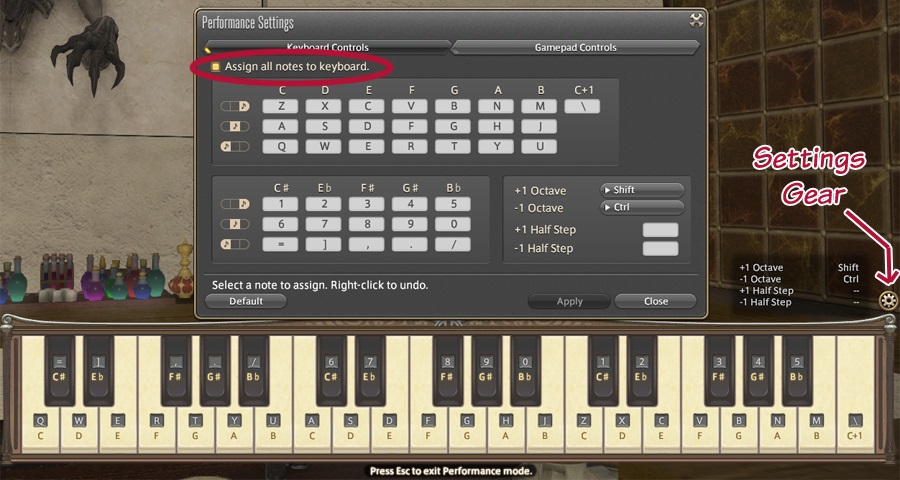
Then, just go and choose which keys to assign to which notes in the settings screen. I followed the example on the BMP site, but I’m not sure if there’s a right or wrong way to do this.
You MUST assign keys for the program to work correctly! Otherwise, you’ll be missing all sorts of notes in all of your songs.
How to Use Bard Music Player
Now it's time to download the BMP and MIDIs you can use.
- Download the BMP ZIP file from the website.
- Extract all files from the ZIP file you just downloaded into a folder. You can put this folder anywhere, but note that the .EXE called Bard Music Player is what you use to launch the program. I suggest you add a shortcut to this .EXE on your desktop.
- Download some MIDI files that have been modified for use in FFXIV. The XIV MIDI Library is a good site to start with.
- Put these MIDI files in a folder somewhere on your computer. The folder location doesn't matter, but put them somewhere you can easily browse to.
- While your character is in Performance mode in FFXIV, launch the Bard Music Player using the .EXE file.
- Click the please load a song section to browse and select one of the MIDI files you downloaded, then click the Play button to begin playing.
- You can also create playlists by clicking New in the Playlists section, and clicking + to browse for MIDIs and add them to the list!
If you need further help, I sugggest joining the BMP Discord. There's a support channel for folks to ask questions.
Getting MIDIs
Keep in mind that there are some limitations placed on what MIDIs can be played in FFXIV, so pulling an unedited MIDI file off the net may sound like a muddled mess until edited.
Rule of thumb for MIDI files with FFXIV performance: FFXIV only supports notes in a three octave range (C3 to C6). Anything beyond that simply won’t register and play in game.
But! The community has also done a lot of work in creating and sharing MIDIs!
Where to find some:
- Visit the XIV MIDI Library
- Join the BMP Discord – there’s a channel for sharing MIDIs there
- Join the Bard Music Library Discord
- The FFXIV Performances Reddit has MIDIs for download
If you still want to create your own, the BMP manual has a section with some software suggestions you can use for editing MIDI tracks. I’ve used a combination of Noteworthy and Online Sequencer with some success.
So what are you waiting for? Get out there and Bard!